Reverse Video Search
Find where your videos are being reused, reposted, or ripped across the web. Revideo helps creators, agencies, and copyright owners find stolen content, gather evidence, and take action when someone reuses your content without permission.




One Search. Every Platform at Once.
No single search engine covers the whole web. Google can't see what Yandex indexed. Yandex doesn't look inside TikTok. Revideo runs them all in parallel.
What Are You Trying to Find?
Revideo helps you find videos and protect your own content. Pick the option that best matches what you're looking for.
I'm Looking for a Video
You have a clip, GIF, screenshot, or scene and want to find the full video. Revideo works as a video finder, matching your frames against indexed videos across the web to find the original upload, source link, date, and similarity score.
- ✓Find the full video from a short clip
- ✓Find a video from a screenshot or GIF
- ✓Find similar videos and re-cuts
- ✓Find a deleted or reposted upload
Someone Is Using My Video
Your clip is on an account that isn't yours. Revideo helps you find matching copies across the web, compare uploads to identify the earliest known source, and collect the evidence you need to take action.
- ✓Every duplicate upload, ranked by match confidence
- ✓Timestamped proof of who posted first
- ✓Pre-filled DMCA notice per platform
- ✓Alerts when monitoring finds a new copy
Manual Video Searches Don't Scale.
Three things people try when they need to trace a video. Here's the same clip, searched the same day, using each method.



Your videos are working for someone else.
Your roster is being ripped around the clock
Fake accounts and stolen clips take your creators' views. Nobody can check every app by hand, every day, for thirty people. One dashboard, one sweep, every creator.
The stolen copy is beating your original
Your clip, their account, no credit. They collect the views and the brand deals, and their upload outranks yours in search. Revideo tells you the moment a copy appears.
Is this clip what it claims to be?
A video "from yesterday" has been circulating since 2019. Revideo orders every known upload by date and shows you the earliest, so you can see who posted first and whether it's been generated or altered.

Publish the wrong clip once, lose trust forever
Get the source, the first-publish date and a record your editor can check, before it airs. Checked in under 30 seconds.
How Revideo's reverse video search works
Revideo is a reverse video search engine, not an image search with a video upload button. When you add a clip, we break it into keyframes, build a visual fingerprint from those frames and a separate audio fingerprint from the soundtrack, then match both against indexed video across search engines and social platforms. There is much more going on behind the scenes.
Add your video
Upload a file, paste a link, or drop in a screenshot or GIF. Any platform.

We fingerprint it
Keyframes extracted, visual and audio fingerprints generated.


We search everywhere at once
Google, Bing, Yandex and direct platform coverage, in parallel.

We verify every hit
Frame match, audio fingerprint, transcript, on-screen text and metadata, scored before you ever see it.

- ✓Analyses the whole video, not one still
- ✓Matches through crops, mirrors, filters and re-encodes
- ✓Audio fingerprint catches re-uploads with new footage
- ✓Every result comes with source link, upload date and similarity score
Why Choose Our Reverse Video Search Engine
Our AI reverse video search is an all-in-one solution for verifying fake news, identifying deepfake videos, and protecting your videos from scammers.
Find Similar Video Source
Find the real owner of any video using our reverse video search tool. It will extract frames from the video and find who uploaded it in the first place and on which platform.
Protect Your Work
Use Revideo to see who is using your video without any credits for scam or fraud. This way, you can protect your work and take immediate action or report their social media accounts.
Detect Fake Videos
Our video reverse search tool lets you identify if a video is real or fake on the internet. This way, you can avoid sharing any misrepresented or manipulated information with others.
Monitor Your Videos
Turn on monitoring and Revideo re-scans the web for your video on your schedule — daily, every two days or weekly — and emails you the moment a new copy appears, with the proof attached.
Spot Scammers Online
Scammers often use someone else’s videos or clips to scam people online. Protect your identity with this reverse video search engine and see who is using your videos for unethical purposes.
Multi-Platform Video Tracking
Locate where your video is being used on different social media platforms. Upload the clip, and Revideo.io will extract key frames and search them on TikTok, Reddit, Instagram, Facebook, and beyond.
One place to see every copy and what happened to it.
The queue only shows what needs a decision. Everything else we handle and report back on.
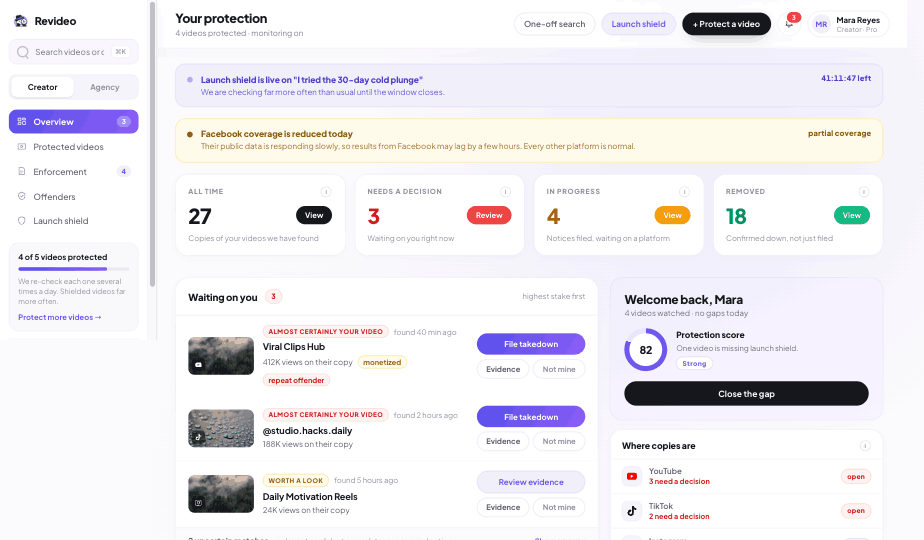
Here's what happens after we remove a copy.
Their page stops working. The views, the search traffic and the ranking go back to your upload instead of theirs.


We find it. We also give you the proof.
Each copy comes with evidence you can send. One email, not a week of screenshots.

We'll check your creators on a call.
Give us three creator names. In 20 minutes you'll see every copy and fake account we find, before you've paid a cent.
- ✓One dashboard for up to 30 creators
- ✓Bulk searches and roster-wide monitoring
- ✓Per-creator evidence exports, DMCA-ready
- ✓Priority takedown support
Thanks — we'll email you within one business day to pick a time. Have three creator names ready.
Frequently Asked Questions
Find out where your video is being used.
Search for your video across YouTube, TikTok, Instagram, and the open web. Find the source, spot reuploads, and keep track of copies.
 Join our Discord
Before we run your search
Large file — background processing
Your video () is over 50 MB and will be processed in the background. We'll send the results to when the search is complete.
Your video is being processed
Your large video has been queued for background processing.
We'll email you when results are ready. You can also check the results page at any time.
Uploading your video
Please keep this tab open while your file uploads
0 MB of MB uploaded

Analyzing your clip
Scanning 50M+ videos across various platforms
Usually takes 40 to 60 seconds. Hang tight.
Fetching your video
Resolving the link and scanning 50M+ videos across platforms
Usually takes 40 to 60 seconds. Hang tight.
Cancel this search?
This will stop the upload/analysis in progress. You'll need to start over if you want to search again.
Alert
Daily Search Limit Reached
Don't wait until tomorrow. Upgrade to Premium and continue searching without limits.
Premium Features
- Unlimited daily searches
- Priority processing speed
- Access all platforms
- No captcha required
- CSV export & advanced filters
Need One More Search?
Pay once and unlock this search instantly. No subscription required.
Unlock this search NOW!
- Search one video, image, or URL
- View all matching results with source links
- No subscription or auto-renewal
Secure checkout powered by Stripe