Drop in one video. See everywhere it lives online.
Revideo breaks your video into frames, sound and text, searches the web and the big video platforms, and shows you every copy, with the evidence to prove it.
Upload a file or paste a link.
Match frame by frame, not by title.
Titles and captions change. Pictures don't. Revideo compares the actual frames of your video with videos found across search engines and platforms, so a copy still turns up when someone renames it.
Still finds it after someone changes it
The frame content is the same, so it still lines up.
A new title and channel don't hide the frames.
A few seconds of matching frames is enough to flag it.
Results depend on what is publicly available and indexed by each source.
Looks similar isn't proof. Six signals are.
Deep Search goes wider, collecting candidates from many more sources, then checks every one with six independent methods. You get matches you can stand behind, not a pile of look-alikes.
The six checks, in motion
Some checks only run when the video has that content. Subtitle matching needs subtitles or speech, for example.
Compares the picture itself, frame against frame.
Recognises the same soundtrack, even under new visuals.
Lines up captions or spoken words between the two videos.
Reads the words burned into the frames and compares them.
Checks whether the cover image was lifted from your video.
Weighs the available file and listing details as supporting evidence.
Every match opens head to head.
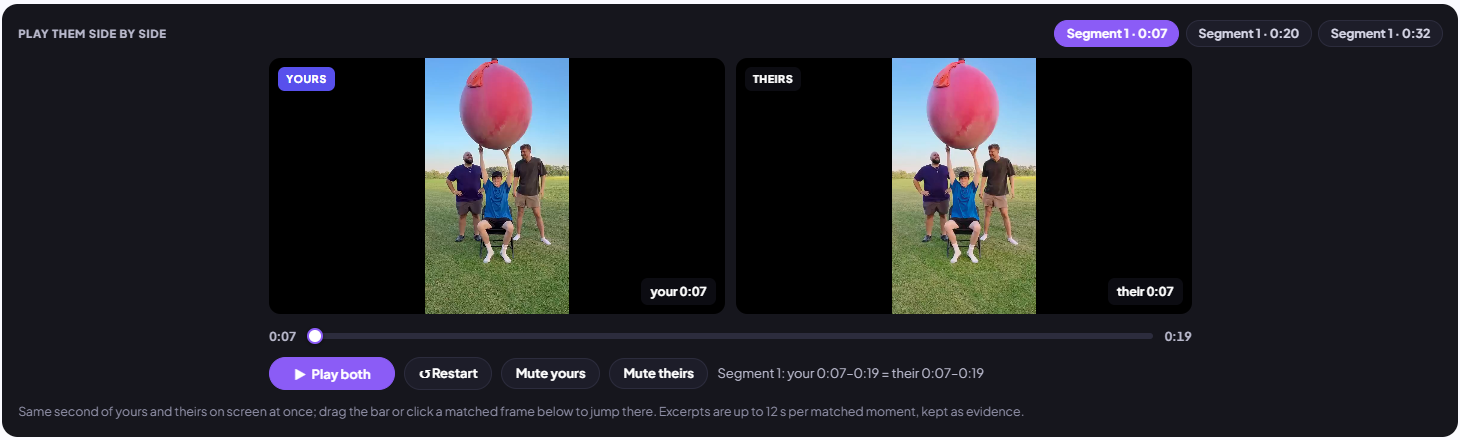
Play your video and the match side by side, jump to the frames that matched, and see which signals agreed: visuals, audio, subtitles and on-screen text. Judge it yourself before you act.
Find the copies. Keep watching. Keep the receipts.
Searching once tells you where your video is today. Protection keeps going: it spots reuploads, re-checks on a schedule, emails you when something new appears and packages the evidence.
See where your video spread without you.
Search with your own upload and Revideo maps the potential copies: full reuploads on other channels, clips on short-video apps, embeds on websites. Each one comes with its source link and the matching details.
Set it once. Revideo keeps looking.
Pick a video and a schedule. Revideo re-runs the search on that schedule and emails you when it finds something new, so a fresh reupload doesn't sit there for months before you notice.
- 1Click Monitor this video on any result
- 2Choose how often it's checked
- 3Open the alert and review new matches
Monitoring schedules and access depend on your plan.
schedule Check Search New match Email
Turn findings into evidence you can send.
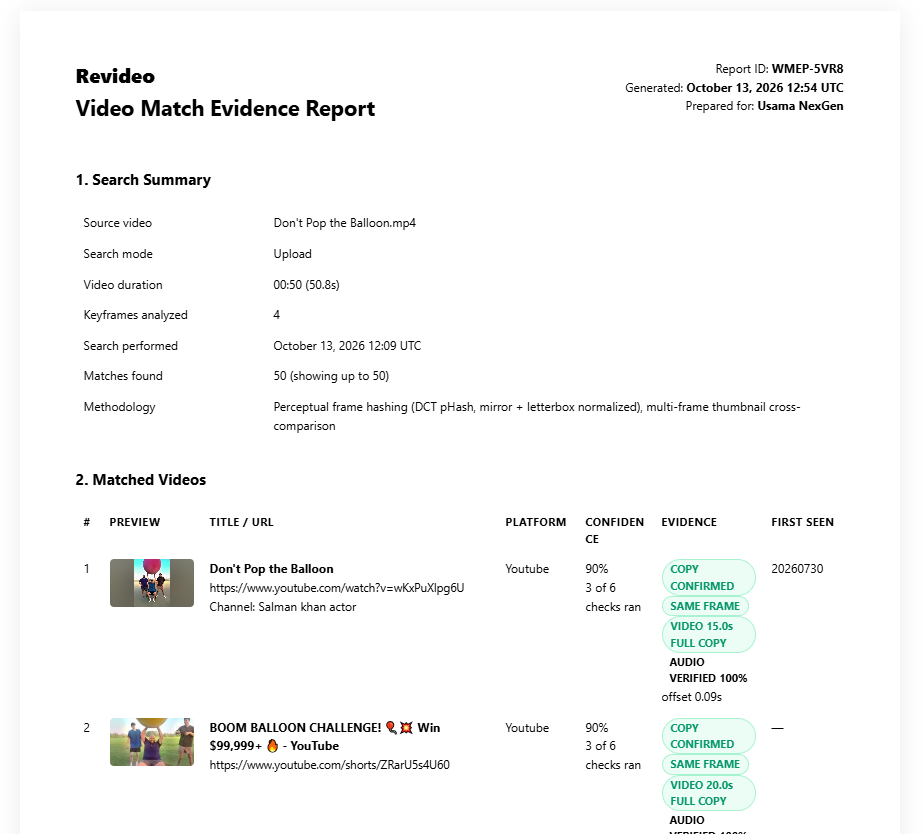
Export your results as a CSV for your own records, or generate an evidence report with the search summary and every matched video and its source, ready for a takedown request or a client.
Available on supported plans.
One search. The whole web.
Search engines, the big video platforms and 100+ other platforms and websites, all from one upload. Each source is searched in its own way, so coverage and results vary by source.
Who uses Revideo
Questions, answered
Comparing tools? Read Revideo vs. InVID-WeVerify, or grab a clean frame with the free Video Frame Extractor.
What's the difference between Reverse Video Search and Deep Search?
Reverse Video Search matches the visual frames of your video to find where it appears, with results in seconds. Deep Search looks across more sources and checks each candidate with six verification methods, so you can see how and why a video matches. It takes a few minutes.
Which verification methods does Deep Search use?
Visual matching, audio fingerprint, subtitle matching, OCR (on-screen text), thumbnail verification and metadata matching. Some only run when the video has that content.
Which platforms does Revideo search?
Google, Bing, Yandex, YouTube, TikTok, Instagram, Facebook and 100+ other platforms and websites. Coverage and results vary by source.
Can Revideo find unauthorized reuploads of my videos?
Yes. Search with your own video to find potential copies and see where they appear, with the matching details. Results depend on what is publicly available and indexed, so no tool can guarantee it finds every copy.
How do monitoring and email alerts work?
Add a video to monitoring and choose how often it's checked from the schedules on your plan. When a check finds relevant results, Revideo emails you so you can review them.
Can I export results or create evidence reports?
You can export supported results as CSV and generate evidence reports with the search summary and matched videos and sources. Availability depends on your plan.
What's included in each plan?
Basic reverse video search is free to try. Deep Search, monitoring, alerts and evidence reports are on paid plans. See Pricing for details.
Where is your video right now?
Run your first search free and find out in seconds.
Start a free search