YouTube Video Finder
Upload a video clip, screenshot, or extracted frame to find matching videos on YouTube without knowing the title, channel, or keywords.
Drop your video here or click to upload
MP4 · MOV · AVI · WEBM · GIF · Max 50MB
Search by Video URL
Paste a direct link and we'll trace the original source instantly
Find a YouTube Video from a Clip
Watched a video clip and want to find the full version of it? YouTube Video Finder can help you find the complete video on YouTube with just a short clip. No manual effort, no keyword searching, just a simple and easy way to see which YouTube video it is.
You can use our free YouTube video search tool for different purposes. It can be used to find the original upload, duplicate versions, related content, or track down the full-length video on YouTube.
How to Use Our YouTube Video Finder
Using our YouTube reverse video search tool is as easy as pie. Just follow the steps below, and you’ll have your video in no time.
-
Upload a video or clip: You just upload the short clip, and YouTube Video Finder will do the heavy lifting.
-
Revideo extracts relevant frames: It then picks out the keyframes from the video and initiates the search process.
-
Searches for matching video sources: The tool will then search each frame across the indexed database of YouTube to find similar matches.
-
Review matching YouTube videos: Within seconds, you will get all the similar clips posted on YouTube. Verify and review them, and see similar or duplicate videos.
-
Open the original/source result: Once you find the right video, click the “Source link” and get straight to the source.
What Can You Find with YouTube Video Finder?
This YouTube video search tool isn’t limited to a simple search. You can identify full videos, trace the original source, find videos using a screenshot, or find unauthorized reposts with this one single tool – all in one place.
Full YouTube Videos From Short Clips
Use our reverse YouTube video search tool to locate the full-length video using a short clip. Just upload the video into the tool, and it will find the complete video in just a few clicks.
Original YouTube videos
YouTube Video Finder by Revideo can also help you find the original video on YouTube. This way, you can get the original information of a video and find the very first video that was uploaded on YouTube.
Video Sources
Find Potential Video Sources and see where it is uploaded online. All you have to do is upload the clip, and our YouTube Video Finder will give you the source link of the video.
Reuploaded Versions
You can also check who is reposting your videos on YouTube without your permission. Our YouTube Reupload Finder will find all the unauthorized reuploads and provide you with the list along with their source links.
Similar Videos
Discover similar videos from the same creator on YouTube using this tool. It matches the frames with different videos and finds similar copies of a video.
Videos From Screenshots or Frames
You can also search using specific keyframes taken from the video. Just upload that extracted frame into YouTube Video Finder by Revideo, and it will show you all the matching or similar YouTube videos.
How Does the YouTube Video Finder Work?
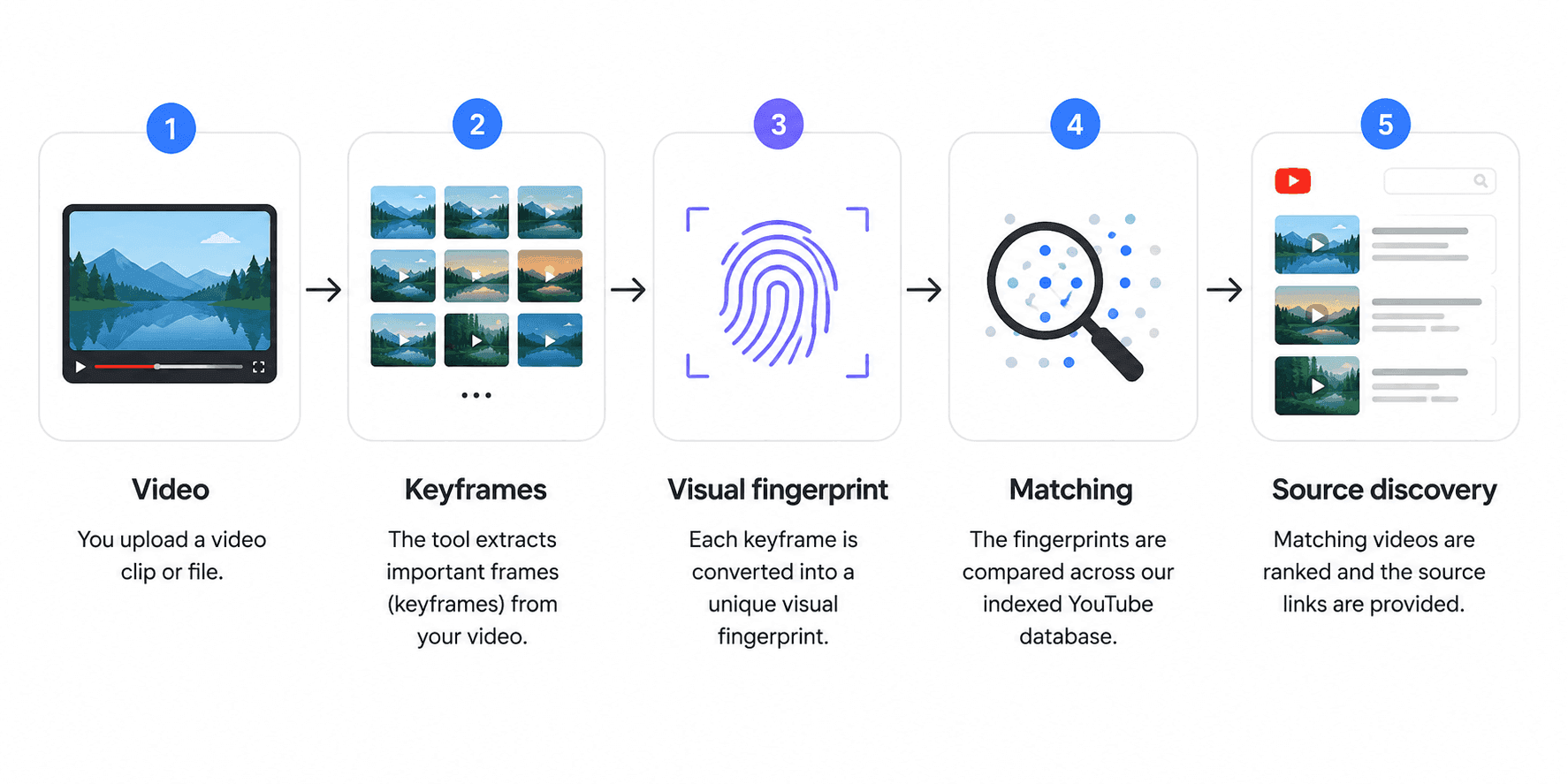
The working mechanism of our YouTube video search tool is based on advanced computer vision (CV) and machine learning (ML) technologies. Below you can find a visual representation of how this video search tool works:
YouTube Video Finder vs. YouTube Search
YouTube’s normal search primarily relies on text-based information such as titles, descriptions, channel names, and other indexed signals. That works well when you know what to type, but it can be a bit of a needle in a haystack when you watched a reel on social media and need to find the original content on YouTube.
YouTube Video Finder takes a different approach. Instead of starting with keywords, you start with the video itself. It uses multiple keyframes from the video, identifies their fingerprints, matches them with the data, and finds similar results. You don't need to remember the title, channel, description, or exact keywords. Start with the video itself.
|
YouTube Search |
YouTube Video Finder |
|
Starts with keywords |
Starts with a video |
|
Requires text clues |
Can use visual content |
|
Searches titles/descriptions |
Matches visual frames |
|
Best when you know what to search |
Useful when you don't know the title |
Who Can Use YouTube Video Finder by Revideo?
Find duplicate videos and identify video reuploads of your original content across YouTube.
-
Content Creators: Find new content ideas for your next YouTube video or see who is using your famous videos without credit.
-
Journalists: Identify the source of a video clip, verify where content was published, and find the original upload.
-
Researchers: Use video search and visual matching to locate relevant videos and trace content back to its source.
-
Social media users: Find a YouTube video from a short clip, screenshot, or downloaded video when you don’t know the title.
-
Copyright owners: Discover matching uploads and potential unauthorized reuploads of your videos on YouTube.
-
Fact-checkers: Identify a video's source and compare different uploads to understand better where a clip originated.
-
Marketers: Track video usage, discover duplicate content, and find related videos across YouTube.
Why Can't I Find a YouTube Video From My Clip?
Sometimes a search may return no results. This does not necessarily mean the tool failed. A matching YouTube video may not be found for several reasons:
-
The video may not be indexed
-
The video may have been deleted
-
The video may be private
-
The footage may have been heavily edited
-
The matching video may use different footage
-
The source may be outside YouTube
-
There may simply be no sufficiently similar indexed result
Frequently Asked Questions
Can I find a YouTube video from a screenshot?
Yes, you can use a screenshot of a main scene to locate the original video on YouTube. Our YouTube reverse video search tool gives you this option where you can upload the screenshot, and it will find matching results across the indexed database of YouTube.
How can I find the original YouTube video?
Just follow these simple steps to find the original YouTube video.
-
Upload the clip into our YouTube Video Finder.
-
It retrieves main frames from the video and matches them with the YouTube indexed database.
-
You will get all the similar sources with their source links and metadata. From that, you can easily find the very first video that was uploaded on YouTube.
Can I search YouTube using a video?
You cannot directly use a video on YouTube to find similar versions. But with our YouTube video search tool, it is possible. Simply upload the video into the tool, and it will uncover all the matching results.
Can I find a video if I don't know its title?
That depends on whether you have a short clip or anything else that could help you out. If you have saved a reel of the same video, you can find the original clip with this free YouTube video search tool, without the need for a title or keyword.
Can I find a Private or deleted YouTube video?
No, this is not possible. YouTube Video Finder can only access indexed and publicly available data on YouTube. So, if a video is deleted or set to private, it can’t be discovered.
Keep Track of Your Videos with Revideo
Used by 50K+ creators, journalists, influencers, and teams to quickly track, verify, and protect video content.
Before we run your search
Large file — background processing
Your video () is over 50 MB and will be processed in the background. We'll send the results to when the search is complete.
Your video is being processed
Your large video has been queued for background processing.
We'll email you when results are ready. You can also check the results page at any time.
Uploading your video
Please keep this tab open while your file uploads
0 MB of MB uploaded
Analyzing your clip
Scanning 50M+ videos across various platforms
Usually takes 40 to 60 seconds. Hang tight.
Fetching your video
Resolving the link and scanning 50M+ videos across platforms
Usually takes 40 to 60 seconds. Hang tight.
Cancel this search?
This will stop the upload/analysis in progress. You'll need to start over if you want to search again.